Close search panel

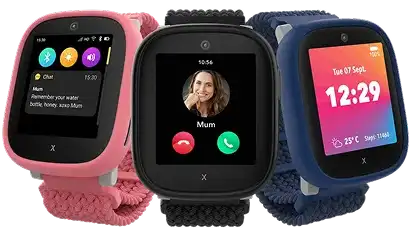
The Xplora X6Play is a first phone your child will actually love, and that you can actually trust. They get calls, voice and messages, a step counter and a 5MP camera. You get access to GPS location, safe zones and an SOS button — all managed from the Xplora app on your phone. And because it's on Tesco Mobile, the watch and its plan arrive together, with no annual price increases.

Pin icon

GPS location & safe zones

Calls & voice messages

SOS icon blue

SOS emergency button

School icon blue

School mode

Camera icon

5MP camera

Protection icon

IP68 water resistant

Everything you need to get started

Step 1: Your Xplora Watch

Xplora X6Play Kids Smartwatch

  • 4G, GPS, WiFi and LBS location
  • 1.52" touchscreen, IP68 water resistant
  • 5MP camera, 8GB storage, up to 72hr battery
  • Two spare frames and loops in the box

€199.99

RRP €0 — price with plan

Out of stock

Step 2: A Tesco SIM

Get this plan for

€10

a month


€10 SIM Only

Monthly rolling contract

  • 5GB data
  • 150 any network minutes
  • 150 any network texts
  • 5GB of your data to use when roaming in the EU
  • Earn points when you pay your bill

Terms and Conditions apply

Today you pay

€209.99

Know where they are, without asking

See your child's location in real time in the Xplora app, and draw safe zones around home, school or a grandparent's house. If they leave one, your phone tells you. No guessing, no "where are you?" texts.

Xplora X6Play - add a safety zone

Xplora X6Play - add a safety zone

School mode keeps lessons distraction- free

Set the hours and the watch becomes a watch — no incoming or outgoing calls, no messages, just the time on the screen. The SOS button still works, so it stays switched on for the one thing that matters.

Xplora X6Play - school mode

Xplora X6Play - school mode

One button, straight to you

Hold the SOS button for five seconds and the watch calls the two family members you've set as admins, one after the other, and pushes your child's location to both phones.

Xplora X6Play - sos button

Xplora X6Play - sos button

One watch, three looks

Every X6Play comes with two extra frames and loops in pink and green, so the watch can change colour whenever they decide it should. Watch faces and backgrounds are swappable too, and it flips between a digital and an analogue clock.

Xplora watch frames image

Xplora watch frames image

Frequently Asked Questions

The Xplora X6Play is recommended for children aged 6 - 12. It's a great choice for kids who are ready for more independence but aren't quite ready for a smartphone. 

Yes. The Xplora X6Play is a great alternative for kids who aren't quite ready for their first smartphone. Available from Tesco Mobile, it lets children make calls, send messages and stay connected with family, without access to social media or an internet browser. Parents can also manage contacts, track their child's location and set up safe zones through the Xplora app.

Yes. The Xplora X6Play uses GPS tracking to let you check your child's location in real time through the Xplora app. You can also create safe zones around places like home or school and receive an alert if your child leaves one. With the Tesco Mobile Kids Watch Plan, your child can stay connected while they're out and about. 

The Xplora X6Play costs €199 upfront, with the Tesco Mobile Sim Only Plan available for €10 a month with Clubcard. The plan includes 5GB of data, 150 any-network minutes, 150 texts and 5GB of your data to use when roaming in the EU. It's a 30-day rolling contract with no annual price increases, and you can earn Clubcard points when you pay your bill. 

The Xplora X6Play comes with GPS location tracking, safe zones, an SOS button and parent-approved contacts. Parents can also activate School Mode to pause calls and messages during lessons while keeping the SOS function available. With no internet browser or social media, it's designed to help kids stay connected safely.

Yes, With the Xplora app, you can manage your child's X6Play smartwatch straight from your own phone. Check their location, set up safe zones and choose who can call or message them, all in one place.

The Xplora app is available for compatible iPhone and Android smartphones.